Brother DCP-L2640DW Review
Quick Navigations
- 1 The Perfect All-in-One Laser Printer for Small Businesses
- 2 What Makes the Brother DCP-L2640DW Stand Out?
- 3 Performance That Keeps Up With Your Business
- 4 Connectivity Options for the Modern Workplace
- 5 Smart Features That Save Time and Money
- 6 What’s in the Box?
- 7 Who Should Buy This Printer?
- 8 Potential Drawbacks to Consider
- 9 Value for Money
- 10 Final Verdict
- 11 Ready to Upgrade Your Office?
The Perfect All-in-One Laser Printer for Small Businesses
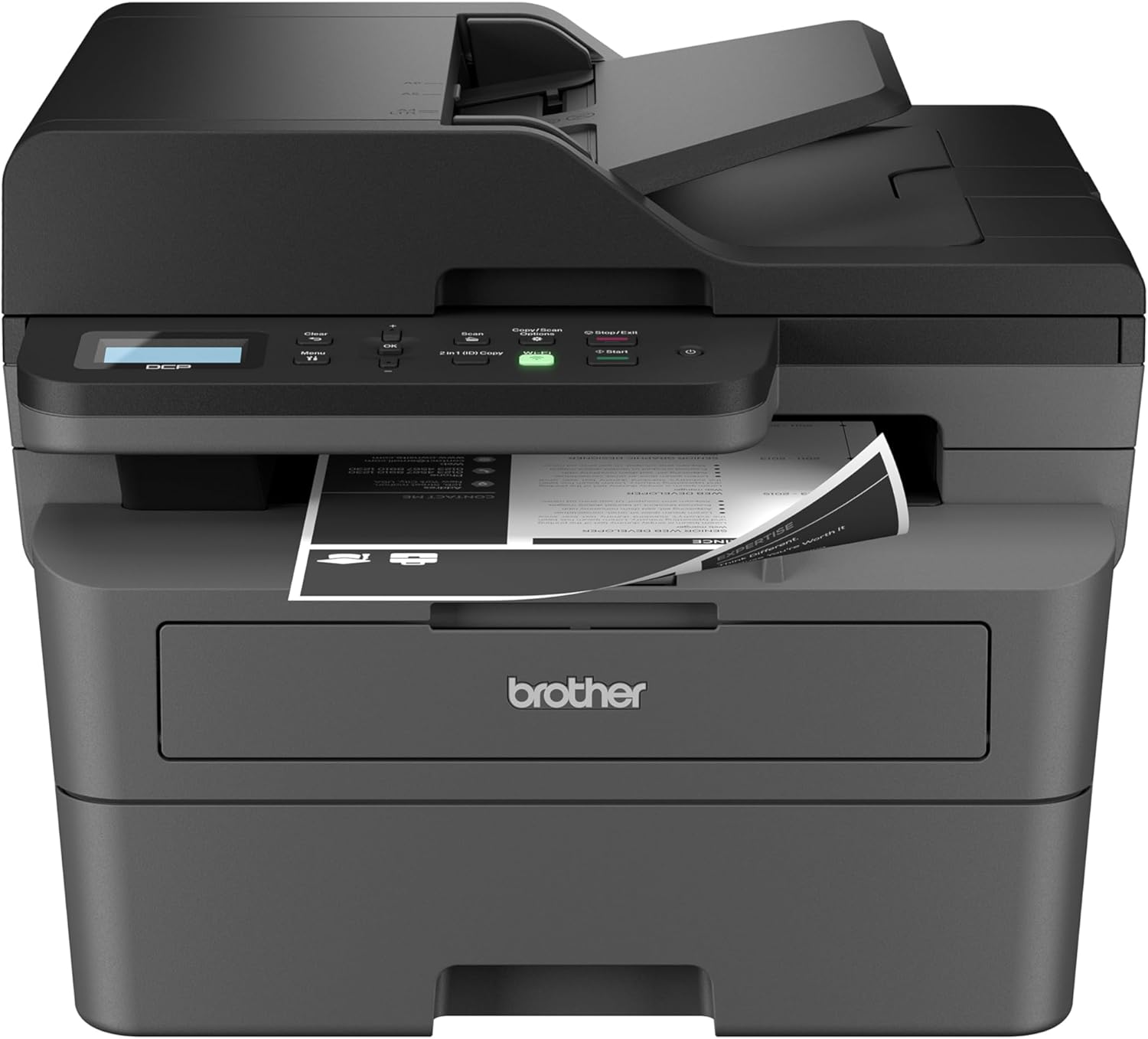
If you’re running a small business or home office and need a reliable, fast, and efficient printing solution, the Brother DCP-L2640DW Wireless Compact Monochrome Multi-Function Laser Printer might be exactly what you’re looking for. After thoroughly evaluating this all-in-one laser printer, I’m excited to share my findings with you.
What Makes the Brother DCP-L2640DW Stand Out?
Brother has engineered this printer specifically with small businesses in mind, and it shows. The DCP-L2640DW combines three essential functions—printing, scanning, and copying—into one surprisingly compact device. What impressed me most is how Brother managed to pack professional-grade features into a footprint that won’t dominate your desk space.
Performance That Keeps Up With Your Business
Speed and Efficiency
Let’s talk about speed, because in business, time is money. This printer delivers impressive print speeds of up to 36 pages per minute. Whether you’re printing invoices, contracts, or reports, the Brother DCP-L2640DW handles them with ease. The scanning capabilities are equally impressive, processing up to 23.6 images per minute for black and white documents.
The 50-page automatic document feeder is a game-changer for busy offices. Instead of feeding pages one at a time, you can load up an entire stack and let the printer do the work. This feature alone has saved countless hours for businesses that regularly scan or copy multi-page documents.
Print Quality
As a monochrome (black and white) laser printer, the DCP-L2640DW produces crisp, professional-looking documents. Text is sharp and clear, making it perfect for contracts, letters, and reports. While it doesn’t print in color, the quality of the black and white output rivals much more expensive models.
Connectivity Options for the Modern Workplace
One of the standout features of the Brother DCP-L2640DW is its flexible connectivity options. In today’s hybrid work environment, you need a printer that can adapt to different scenarios:
- Dual-band Wireless: Connect via 2.4GHz or 5GHz Wi-Fi networks, ensuring stable connectivity regardless of your office setup
- Ethernet: For offices that prefer wired connections, the built-in Ethernet port provides reliable network printing
- USB: Direct connection to a single computer when needed
- Mobile Printing: The Brother Mobile Connect app lets you print and scan from your smartphone or tablet
The mobile printing capability deserves special mention. With the Brother Mobile Connect app, you can manage your printer from virtually anywhere. Need to print a document while you’re on the go? No problem. Want to scan something directly to your phone? Done. This flexibility is invaluable for modern business operations.
Smart Features That Save Time and Money
Automatic Duplex Printing
The built-in duplex printing feature automatically prints on both sides of the paper. This not only saves paper (and money) but also helps create more professional-looking documents. It’s an environmentally friendly feature that pays for itself over time.
Works with Alexa
Yes, you read that right—the Brother DCP-L2640DW works with Alexa. You can check toner levels, printer status, and even order supplies using voice commands. While this might seem like a novelty, it’s surprisingly useful when your hands are full or you’re in the middle of another task.
Brother Refresh EZ Print Subscription
Brother includes a trial of their Refresh EZ Print Subscription service, which automatically delivers toner when you’re running low. The service promises savings of up to 50% on genuine Brother toner, and you’ll never have to worry about running out at the worst possible time. While subscriptions aren’t for everyone, this is worth considering if you print frequently.
What’s in the Box?
When you purchase the Brother DCP-L2640DW, you’ll receive:
- The printer unit
- Starter toner cartridge
- Power cord
- USB cable
- Quick setup guide
- Trial subscription to Brother Refresh service
Who Should Buy This Printer?
The Brother DCP-L2640DW is ideal for:
- Small business owners who need reliable, fast printing without breaking the bank
- Home offices that require professional-quality documents
- Offices with multiple users thanks to network connectivity
- Anyone printing primarily in black and white who values speed and efficiency
- Environmentally conscious users who want to reduce paper waste with duplex printing
Potential Drawbacks to Consider
To give you a balanced perspective, here are a few considerations:
- Monochrome only: If you need color printing for presentations or marketing materials, you’ll need a different solution
- Initial toner cartridge: The included starter cartridge has a lower page yield than standard replacement cartridges
- No touchscreen: The control panel is functional but uses physical buttons and a small LCD display rather than a modern touchscreen interface
Value for Money
Considering the feature set, build quality, and performance, the Brother DCP-L2640DW offers excellent value. Laser printers are known for their lower cost per page compared to inkjet models, and Brother’s reputation for reliability means this printer should serve you well for years to come.
The combination of fast print speeds, wireless connectivity, automatic duplex printing, and scanning capabilities at this price point is hard to beat. When you factor in the cost savings from double-sided printing and efficient toner usage, the printer essentially pays for itself over time.
Final Verdict
The Brother DCP-L2640DW Wireless Compact Monochrome Multi-Function Laser Printer is a solid choice for small businesses and home offices that prioritize reliability, speed, and efficiency. Its compact design belies its powerful capabilities, and the wireless connectivity options make it easy to integrate into any modern office environment.
If you’re tired of slow inkjet printers that constantly run out of ink, or if you’re looking to upgrade from an older laser printer, the DCP-L2640DW deserves serious consideration. The combination of professional-quality printing, convenient scanning and copying, and smart features like mobile printing and Alexa integration make it a comprehensive solution for today’s business needs.
Rating: 4.5/5 stars
Pros:
- Fast print speeds (36 ppm)
- Compact footprint
- Excellent wireless connectivity
- Automatic duplex printing
- 50-page auto document feeder
- Mobile app support
- Works with Alexa
Cons:
- Black and white only
- No touchscreen display
- Starter toner has limited capacity
Ready to Upgrade Your Office?
If the Brother DCP-L2640DW sounds like the right fit for your business, you can check current pricing and availability on Amazon. With its combination of features, reliability, and value, it’s an investment that will improve your daily workflow and productivity.